
Problem today
The Rubrics grading component on our platform fell short of current market demands because of limited functionality and an outdated interface.
Helping Staff should spend their time monitoring and grading student feedback, not working around the module.
Watch the product in action → YouTube video
Read the Compass announcement → Compass - Updates to Rubrics

Rubrics are widely used by Victorian secondary schools, but Compass currently offers a limited rubric experience compared to other assessment platforms.
Schools increasingly use rubrics not just for grading, but to provide detailed feedback on student skills, progress, and achievement. As a result, some schools rely on third-party providers to meet their assessment needs.
This project aims to modernise rubrics, improve flexibility, and create a better experience for teachers, students, and parents.
The Rubrics grading component on our platform fell short of current market demands because of limited functionality and an outdated interface.
On customers (schools), schools were pushed toward third-party platforms for grading, increasing cost and fragmenting day-to-day workflows.
Redesigned the Rubrics experience end-to-end — from creation and configuration to grading and progress insights.
Discover
I built the project roadmap in Monday.com and continuously updated it as the project progressed. This gave Product Owners, Design Managers and SMEs a shared view of the project stages, scope and progress.
Define
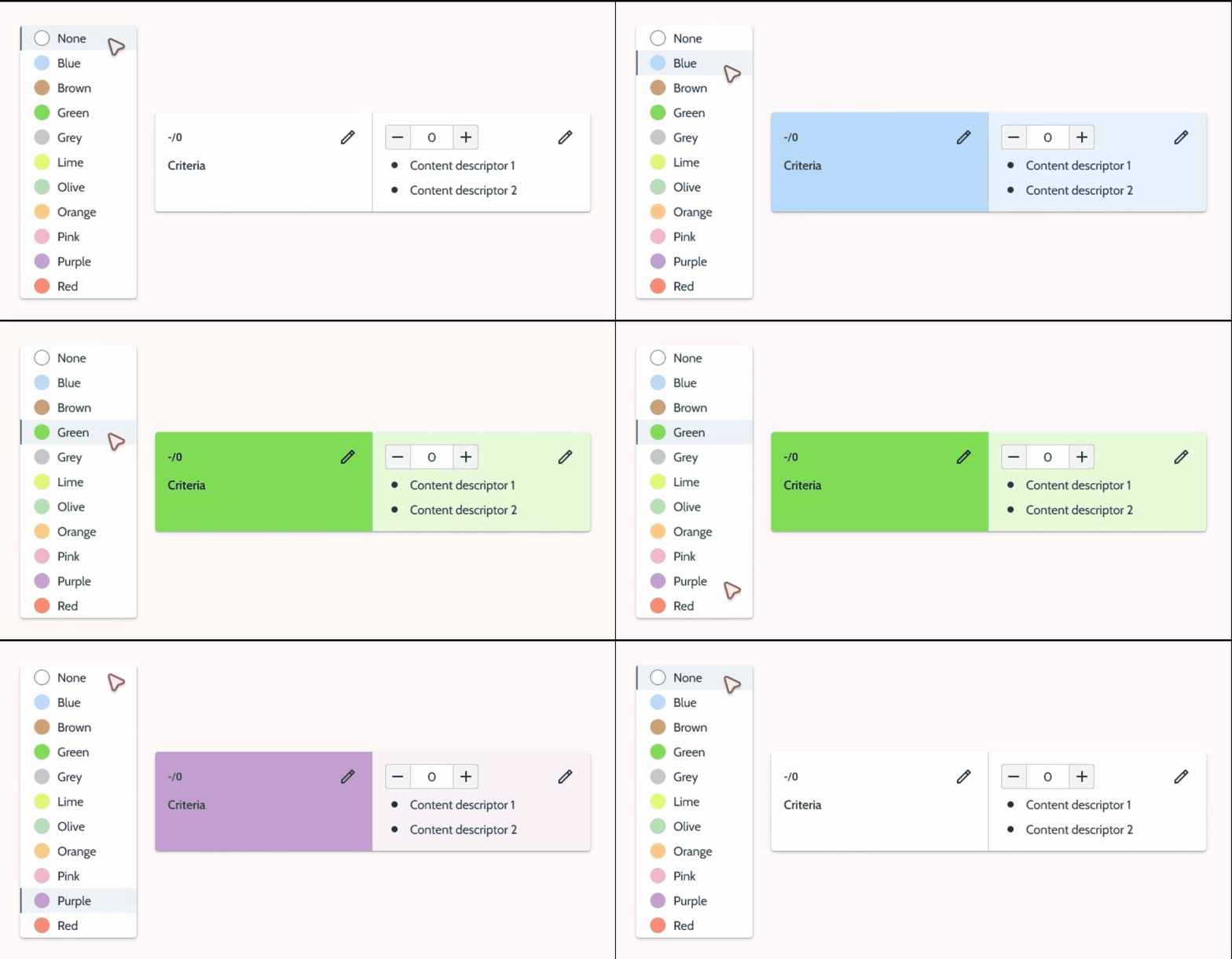
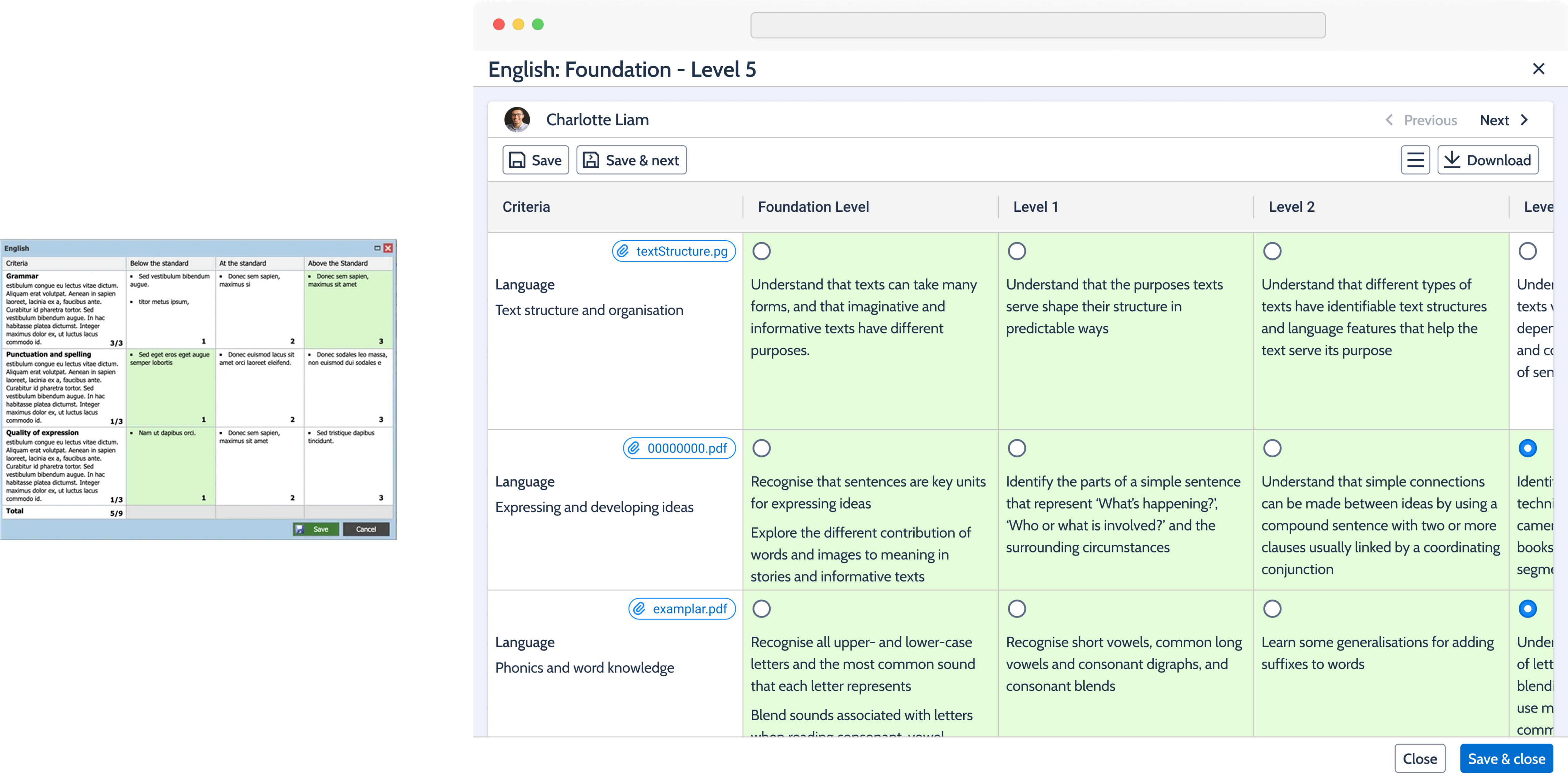
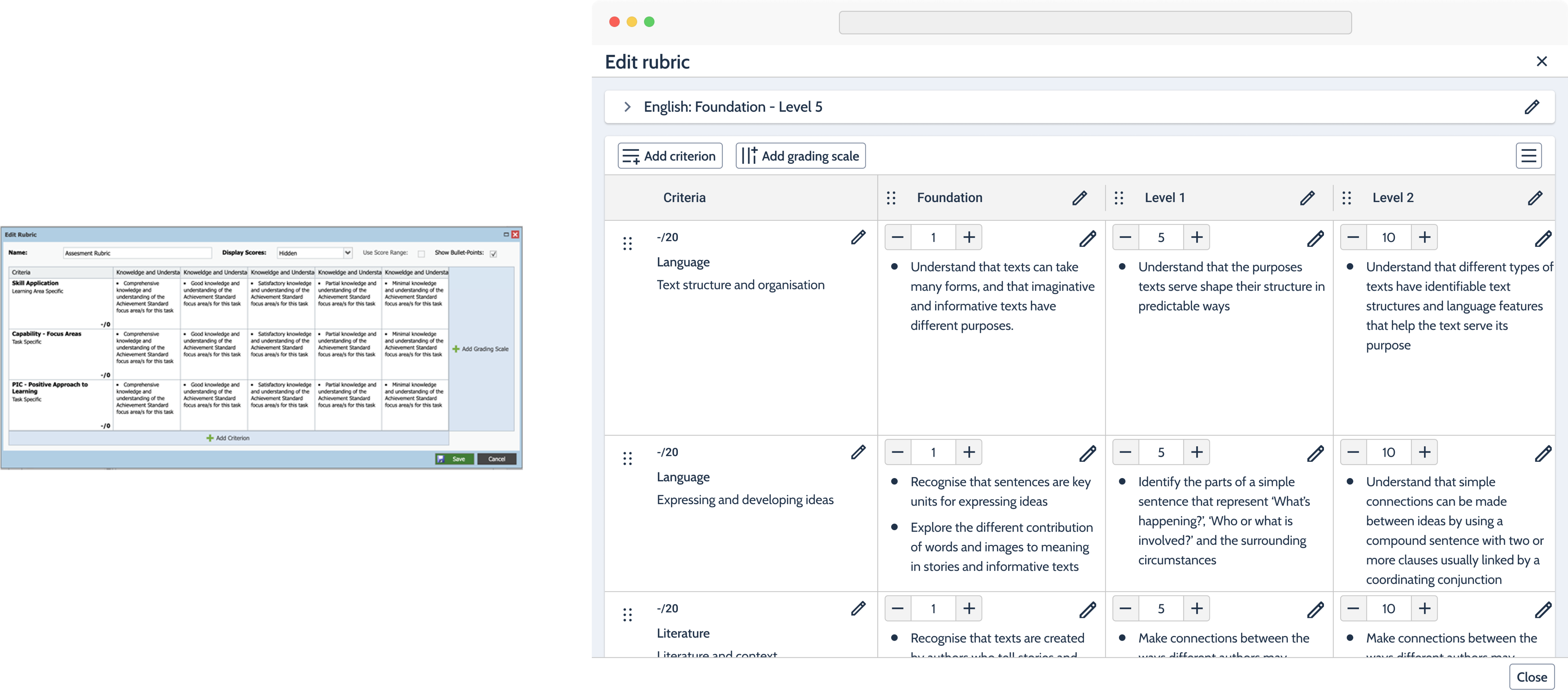
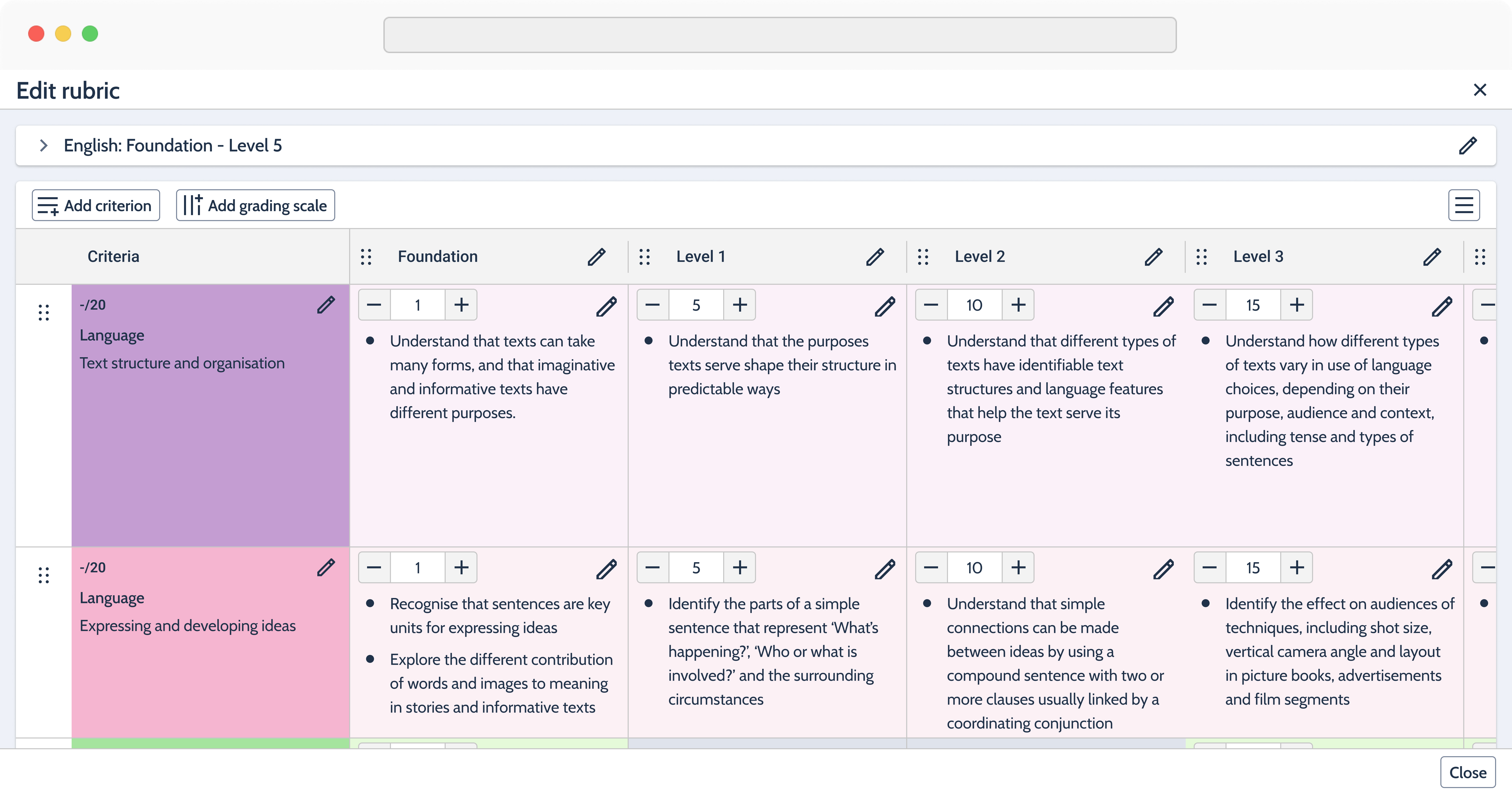
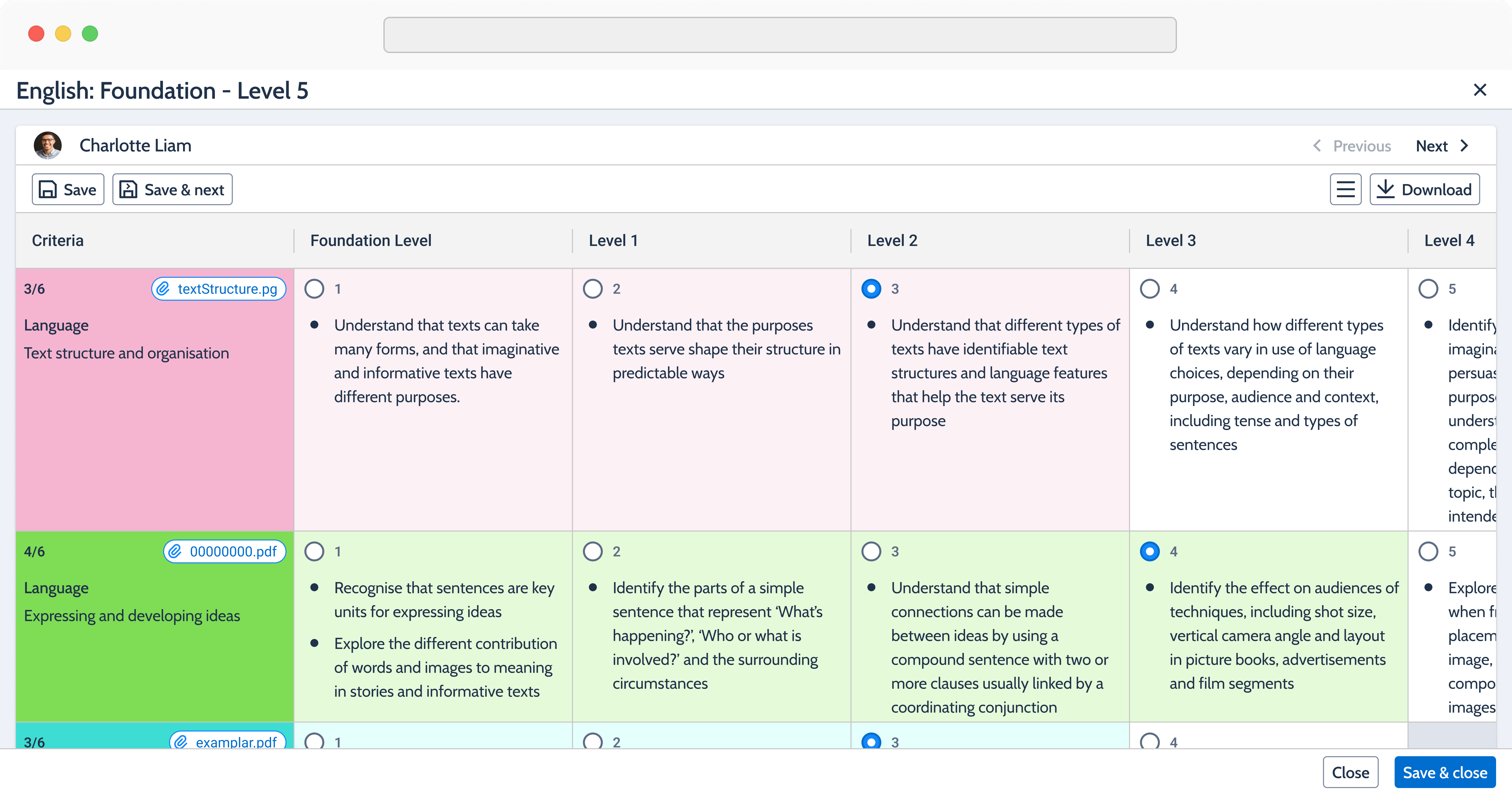
Introducing colors to visually distinguish criterion groups
Criterion grouping was a new feature that could give the rubric experience a meaningful point of differentiation from competitors. However, we needed a way to introduce this visual grouping without significantly increasing the technical scope.
Given the technical constraints and delivery timeline, I introduced color as a lightweight visual grouping mechanism. This allowed criterion groups to be clearly distinguished without requiring backend changes or restructuring the underlying data model.
For this specific use case, I also extended our existing design system with a dedicated Rubrics colour palette of 10 colors, each with 90+, Light, Main, Dark and Text variants. Each variant had a defined purpose across different states and contexts, allowing the colors to remain consistent, accessible and scalable.
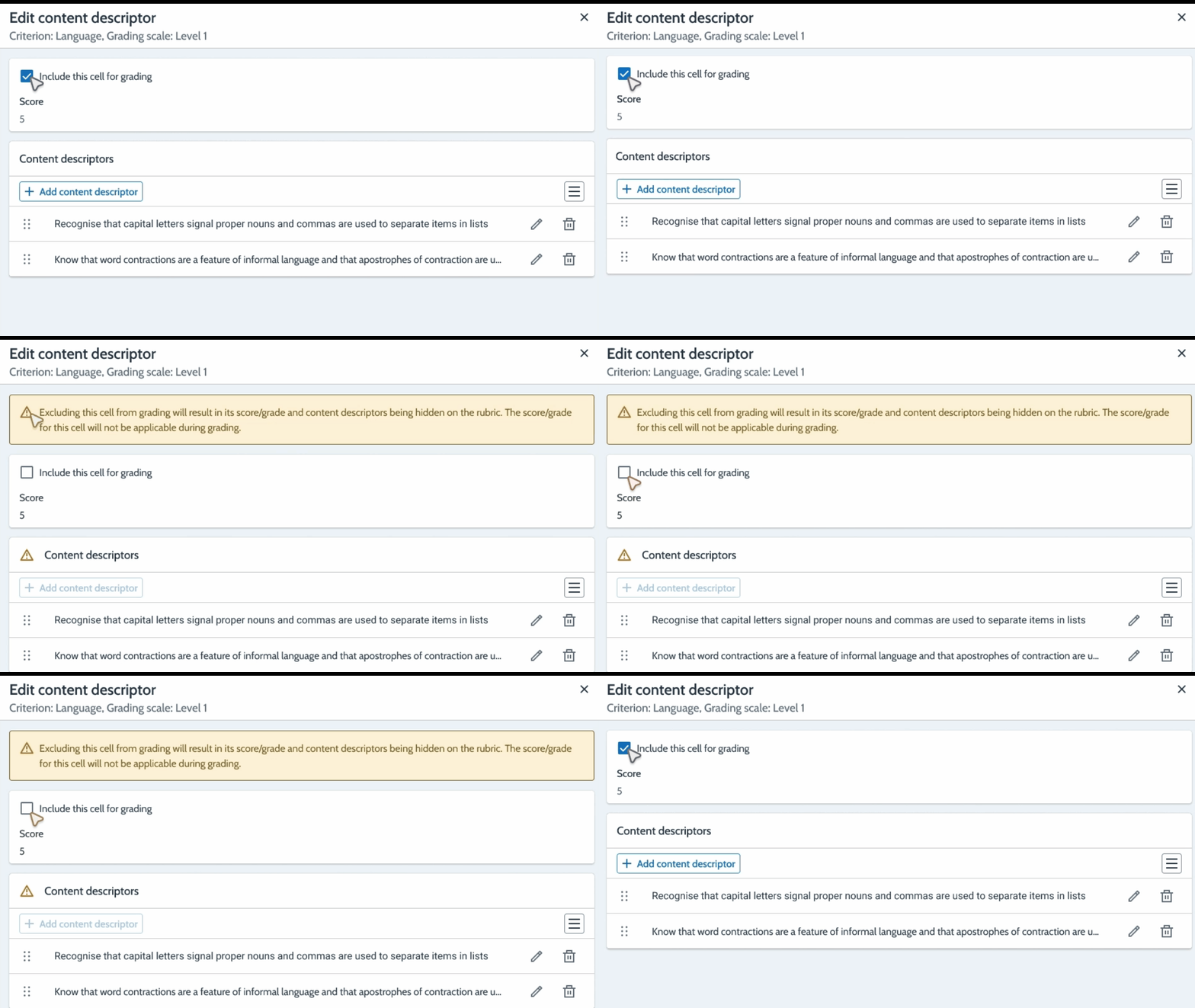
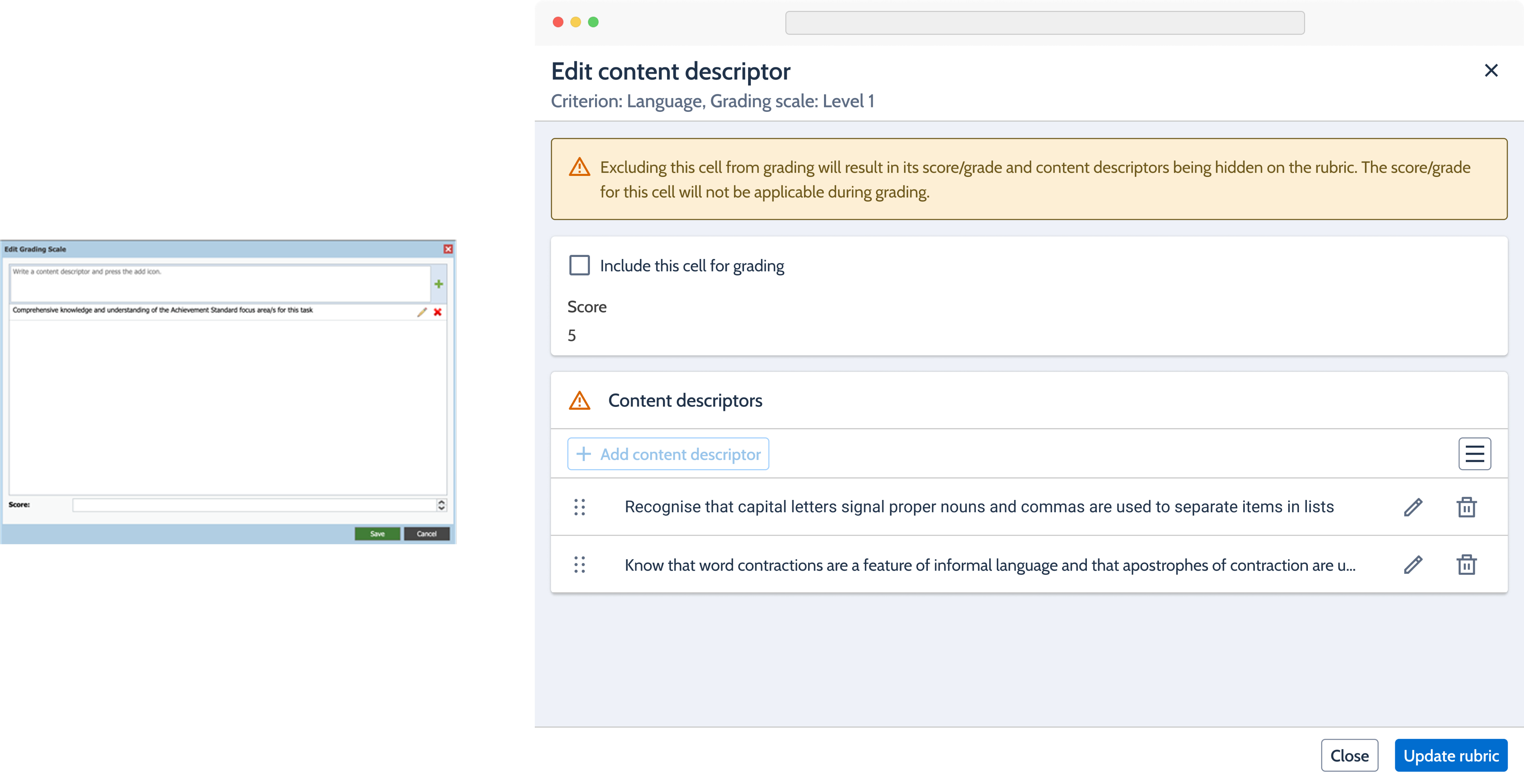
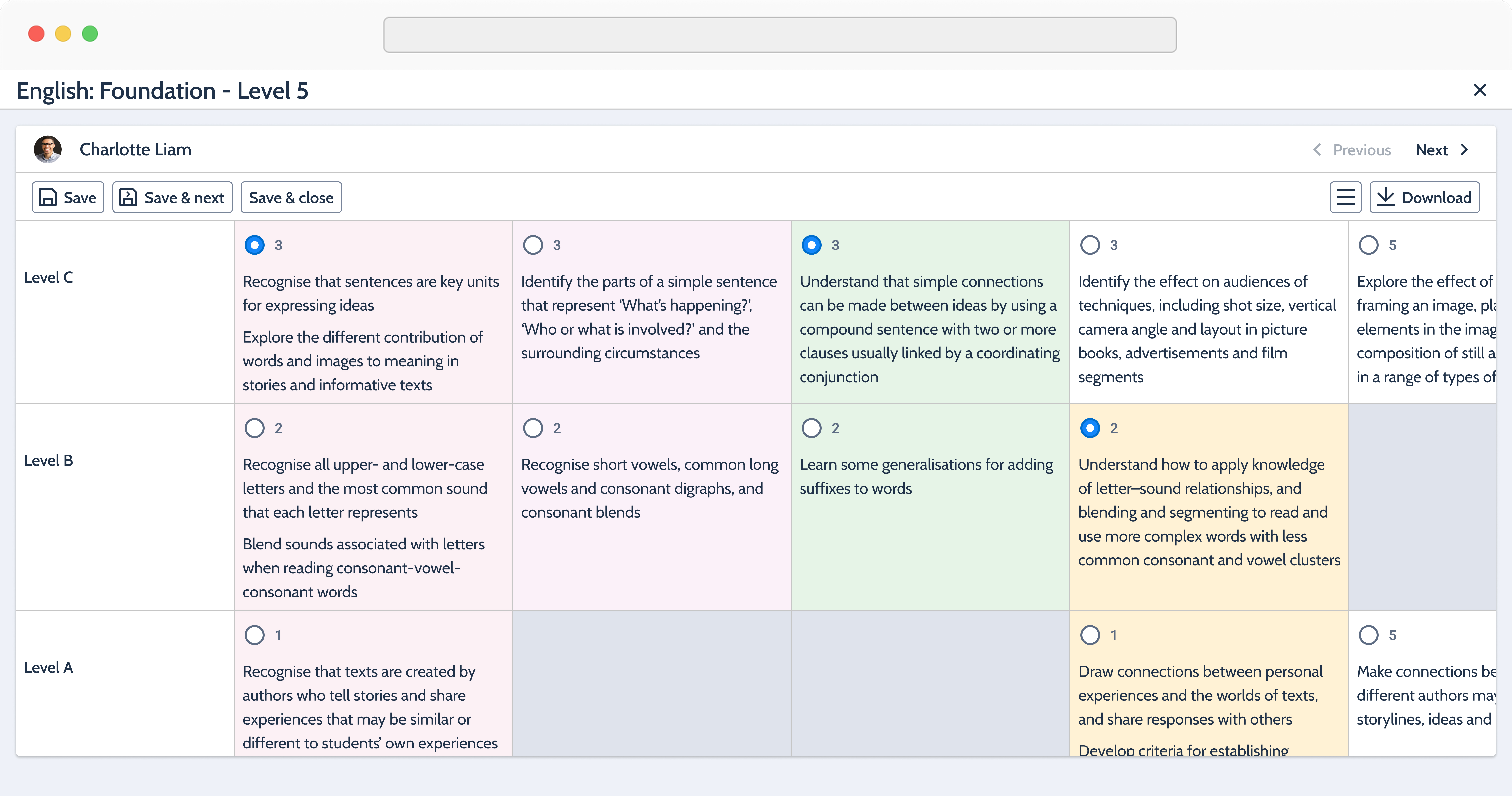
Allowing rubric cells to be excluded from grading (Example developmental rubric)
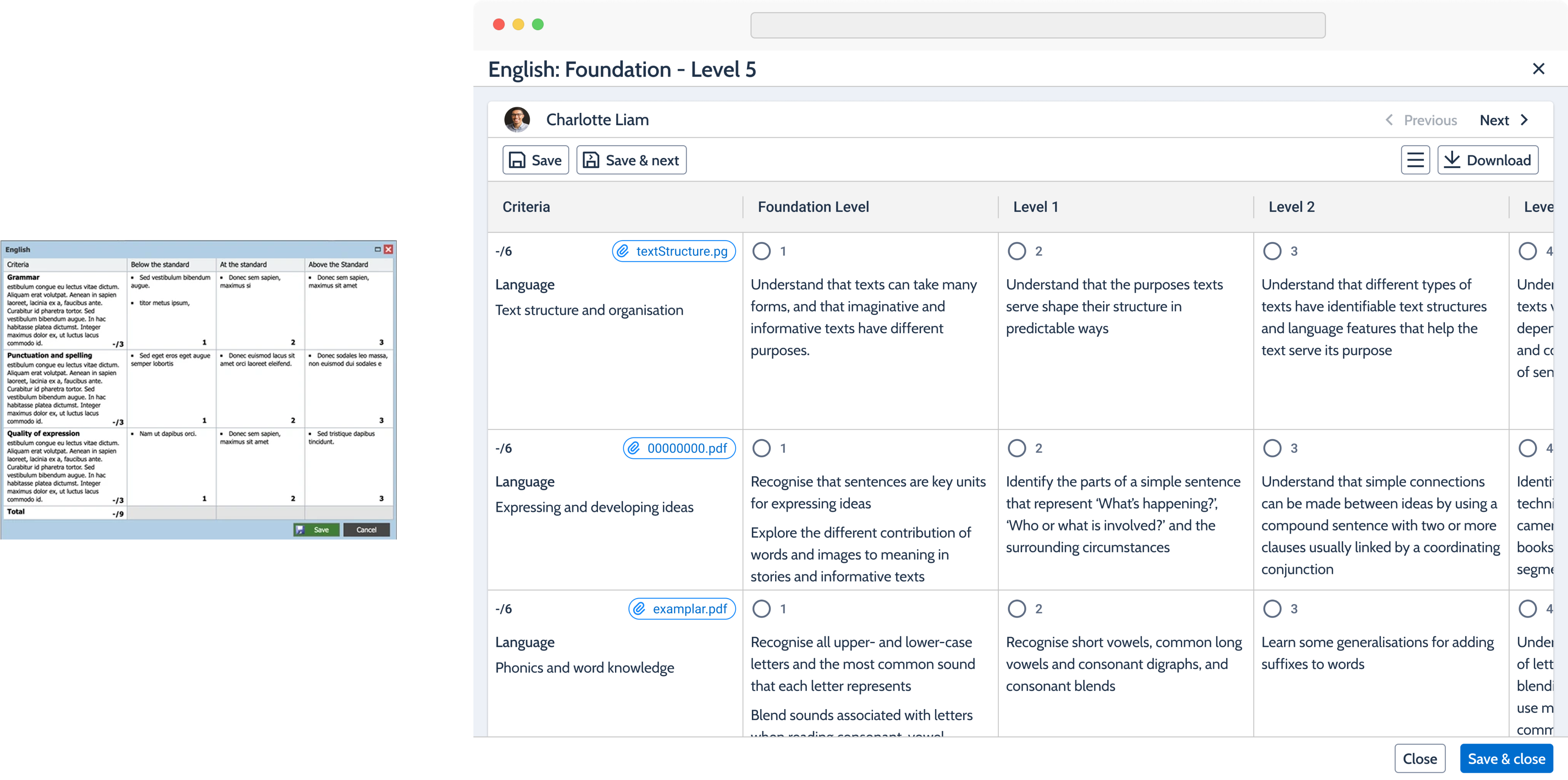
Developmental rubrics can intentionally leave certain cells ungraded when a criterion doesn’t apply to a particular year or term. The existing workaround was to set the cell’s score to 0.
However, this created a logic problem: 0 was still treated as a valid score. So a sequence such as 0, 5, 0, 7, 6, 10 can be added without triggering an error, even when some of those cells were intended to be blank. The workaround therefore blurred the difference between “not applicable” and “scored 0.”
I introduced an “Include for grading” control for each rubric cell. All cells are included by default, but when a user excludes a cell, an alert confirms the change and the cell becomes blank in the rubric grid. Excluded cells are also removed from the grading and score logic, ensuring score sequences are calculated correctly.
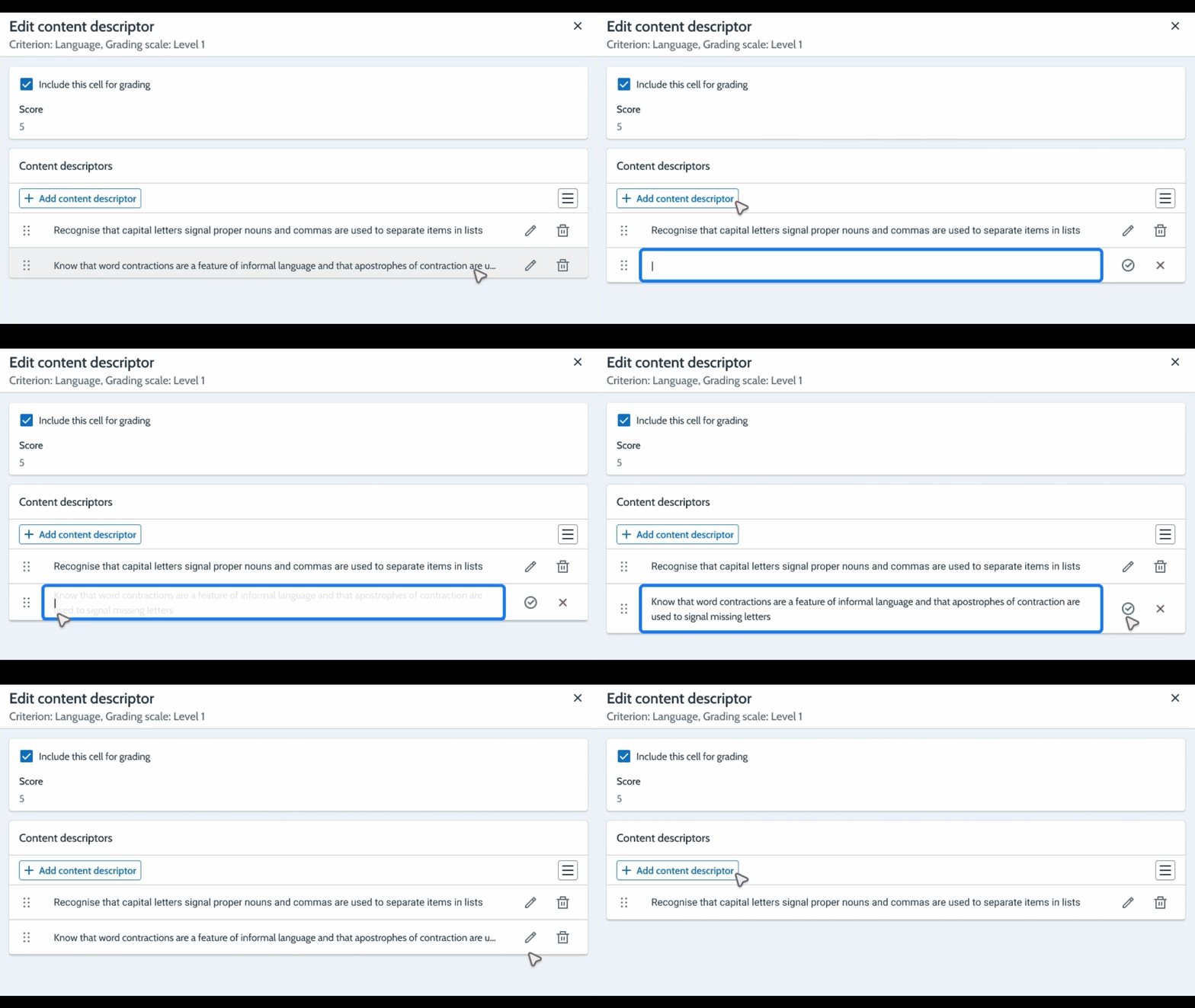
Adding, editing and maintaining content descriptors with ease.
Schools found it difficult to understand how content descriptors could be added. Although drag-and-drop functionality already existed, there were no clear indicators to signal this interaction.
When the content descriptor modal was open, users could no longer see the criteria, grading scale or score, making it harder to understand the context while adding or editing descriptors.
I introduced an inline CRUD grid to make adding, editing and maintaining content descriptors straightforward. A dedicated drag handle was added to the grid to make the existing drag-and-drop interaction discoverable.
I also surfaced the criteria and grading scale in the side panel header, keeping the necessary context visible while users worked on their content descriptors.
Allowing staff to partially grade content descriptors within a criterion.
Some criteria contain multiple content descriptors, but students may only demonstrate some of them. Previously, grading the criterion applied to all descriptors, giving staff no way to record partial achievement without affecting the existing scoring logic.
I introduced independent checkboxes alongside the existing grading controls. Staff can select a grading level as usual, then mark the relevant content descriptors separately. These selections don’t affect the criterion or overall score, and selected descriptors are bolded in downloaded rubrics to make partial achievement visible.
There’s a lot more that went into this! From additional features and workflows to the smaller design decisions and trade-offs along the way. If you’re interested in learning more, feel free to reach out!
Define
I had the opportunity to conduct customer feedback interviews with 6 schools, using the proof-of-concept designs as a basis for discussion. The goal of the customer feed back sessions were to find out if the proposed features will make Compass ‘Rubrics’ stand out over existing modules in other MIS/SIS.
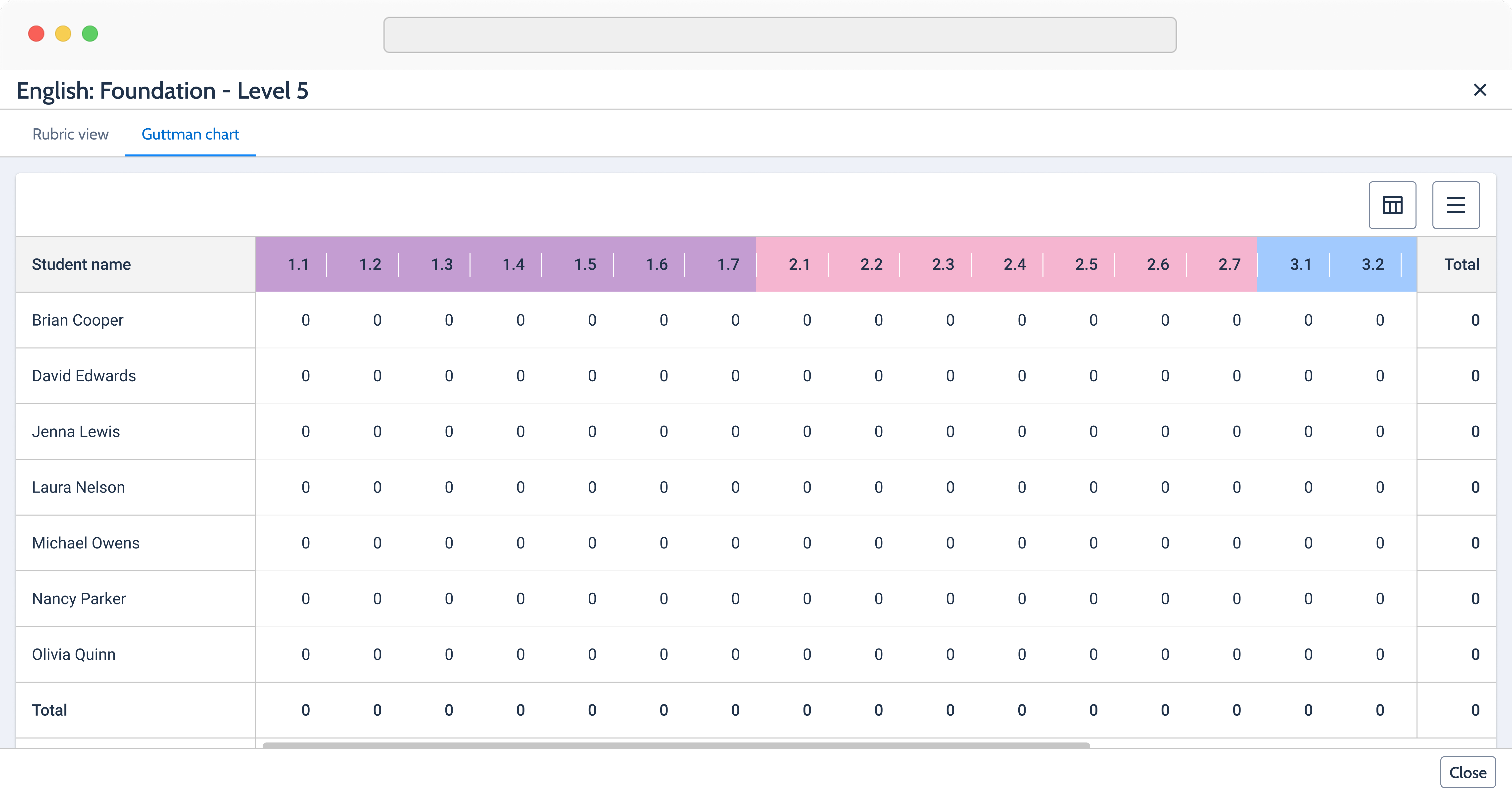
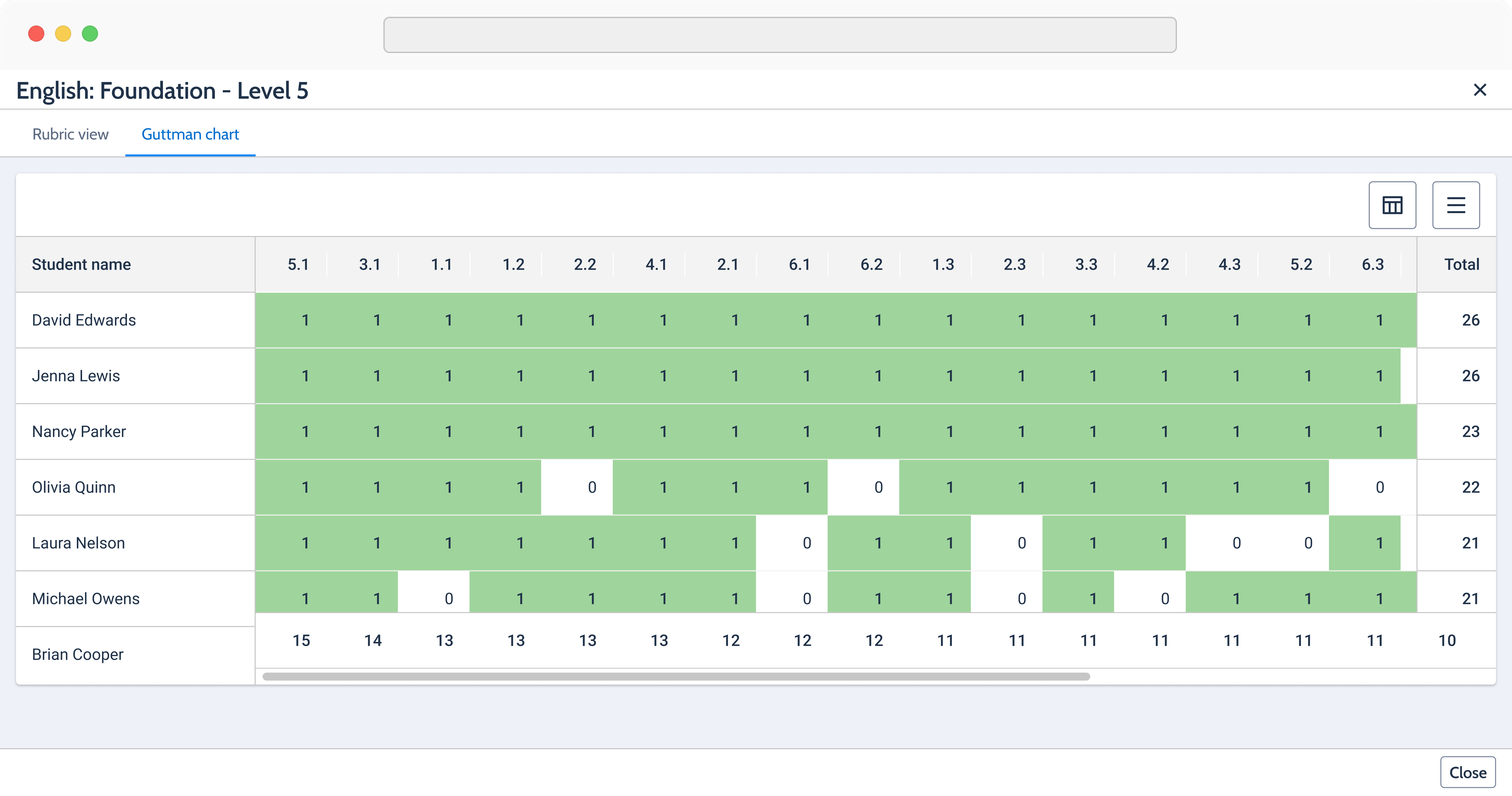
Partial grading (schools couldn’t stop asking about it!). Guttman chart. Victorian curriculum. Ability to move to the next student when grading. Colors for criterion. Blank cells (6/6 schools were ecstatic with this addition)
Manual addition of content descriptors. Flipping rubrics axis - this was because the flipped view was not in the expected layout. Exemplars - few schools wanted to attach the student’s progress on the grading screen. Colors for criterion (some schools love this feature & others just didn’t care)
One of our most influential schools reached out after a demo session to commend our progress and offer their time and support as we prepare to launch the project.
This school acts as an advocate for approximately 180 other schools seeking guidance on ‘Developmental Rubrics,’ making their endorsement a huuuge win for the project!
Deliver
Thanks to the incredible work of 2 amazing designers, we were able to complete the design work 2 weeks ahead of schedule!
The design work for the rubrics grading component was scoped and chunked into workable pieces. The major parts were - Create & edit screen and Grading screen.
What was initially planned as a single task ended up being divided into four separate pieces of work. This massive piece gave a bit of a scare but, by the end of it we were able to find the pot of gold…just joking!

I found more bugs and errors after this! :XD
Rubrics was a legacy module shaped by years of ad-hoc fixes. As a result, behaviors were inconsistent, bugs had accumulated, and even the product team didn’t have a complete picture of how everything worked.
The original scope covered the successful workflows, but as I worked through the dev-ready designs, I uncovered unknown bugs, edge cases and missing validation states that hadn’t been accounted for.
As lead designer, I adapted the scope. I kept the other designer focused on the successful workflows while I took ownership of scoping the error, validation and alert states.
This gave a structured way to tackle complexity that wasn't visible when the project was originally scoped, without slowing down the rest of the design work.
Deliver
There’s a lot more that went into this! If you’re interested in learning more and looking at some prototypes, feel free to reach out!
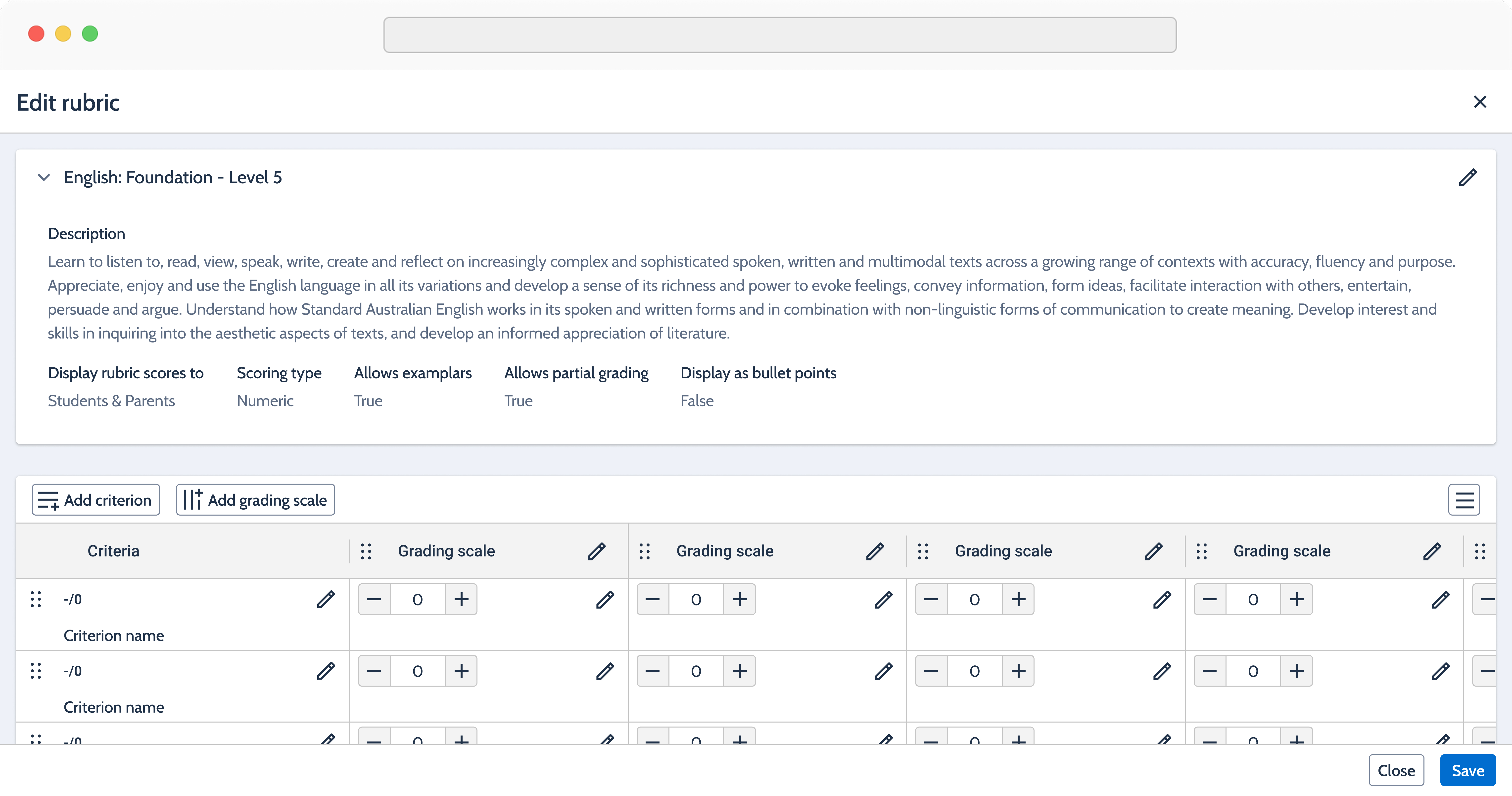
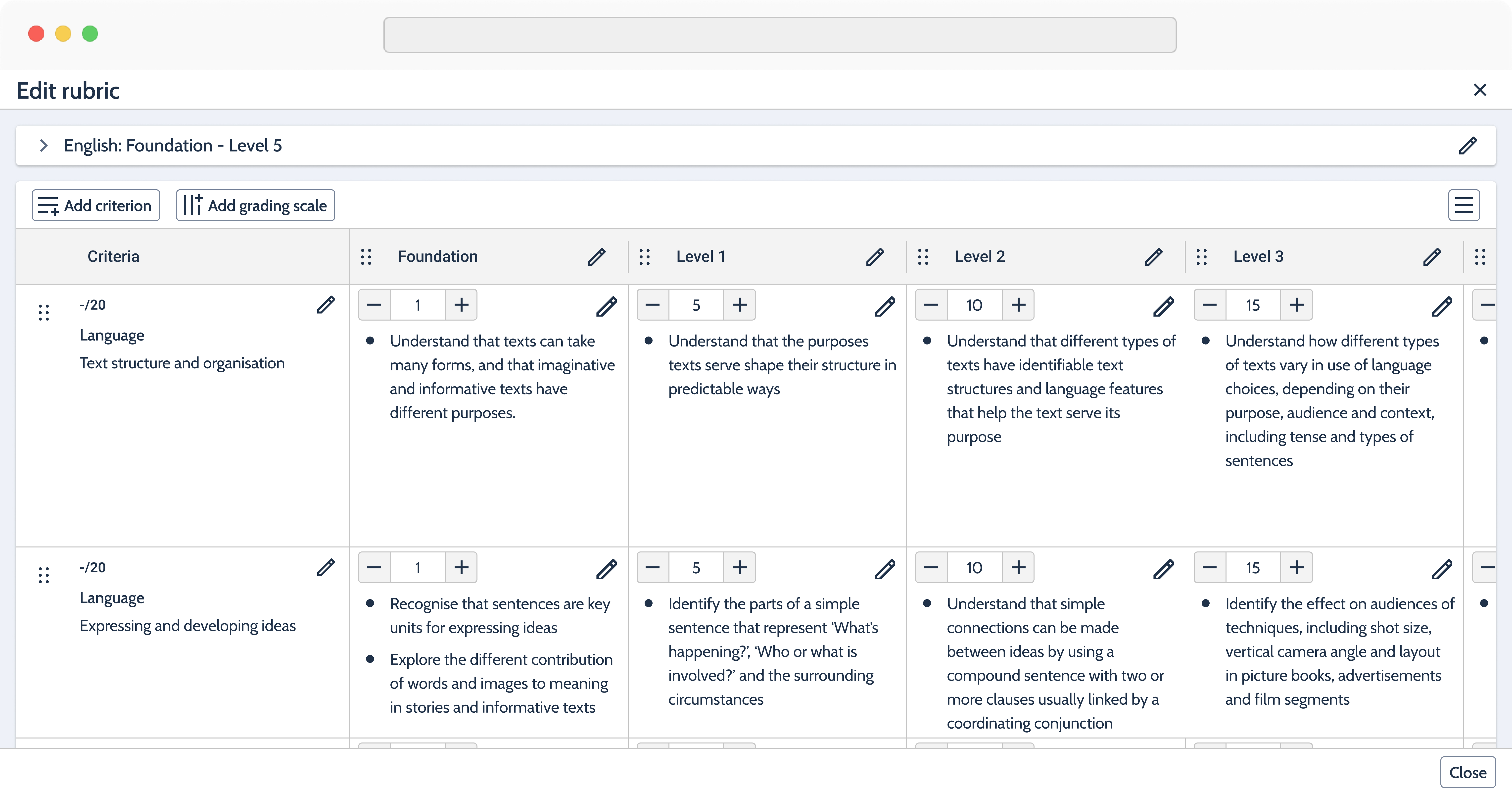
GIVEN I am viewing the ‘Add rubric’ side panel WHEN I have filled in the required fields AND I click [Add rubric] WHEN validation is successful THEN the side panel is dismissed AND the ‘Edit rubric’ side panel is displayed with the details AND a rubric grid is created with the specified number of columns & rows. AND a notification is displayed with the message: ’Rubric successfully added.’ AND the rubric is added to the ‘School resources’ page
GIVEN I am viewing the ‘Edit rubric details’ side panel WHEN I make some changes to the fields AND I click [Save] WHEN validation is successful THEN the side panel is dismissed AND the rubric details are updated on the accordion accordingly AND a notification is displayed with the message: ’Rubric details successfully saved.’
GIVEN I am viewing the "Edit rubric" side panel WHEN I click [Add criterion] THEN "Add criterion" panel is displayed WHEN I fill in all required fields AND I [Save] THEN "Add criterion" panel is displayed in a processing state WHEN processing completes successfully THEN "Add criterion" panel is dismissed AND criterion is added AND the rubric is saved AND notification is displayed with the message: Rubric saved successfully.
GIVEN I am viewing the "Edit rubric" side panel WHEN I click [Add grading scale] THEN "Add grading scale" panel is displayed WHEN I fill in all required fields AND I [Save] THEN "Add grading scale" panel is displayed in a processing state WHEN processing completes successfully THEN "Add grading scale" panel is dismissed AND grading scale is added AND the rubric is saved AND notification is displayed with the message: Rubric saved successfully.
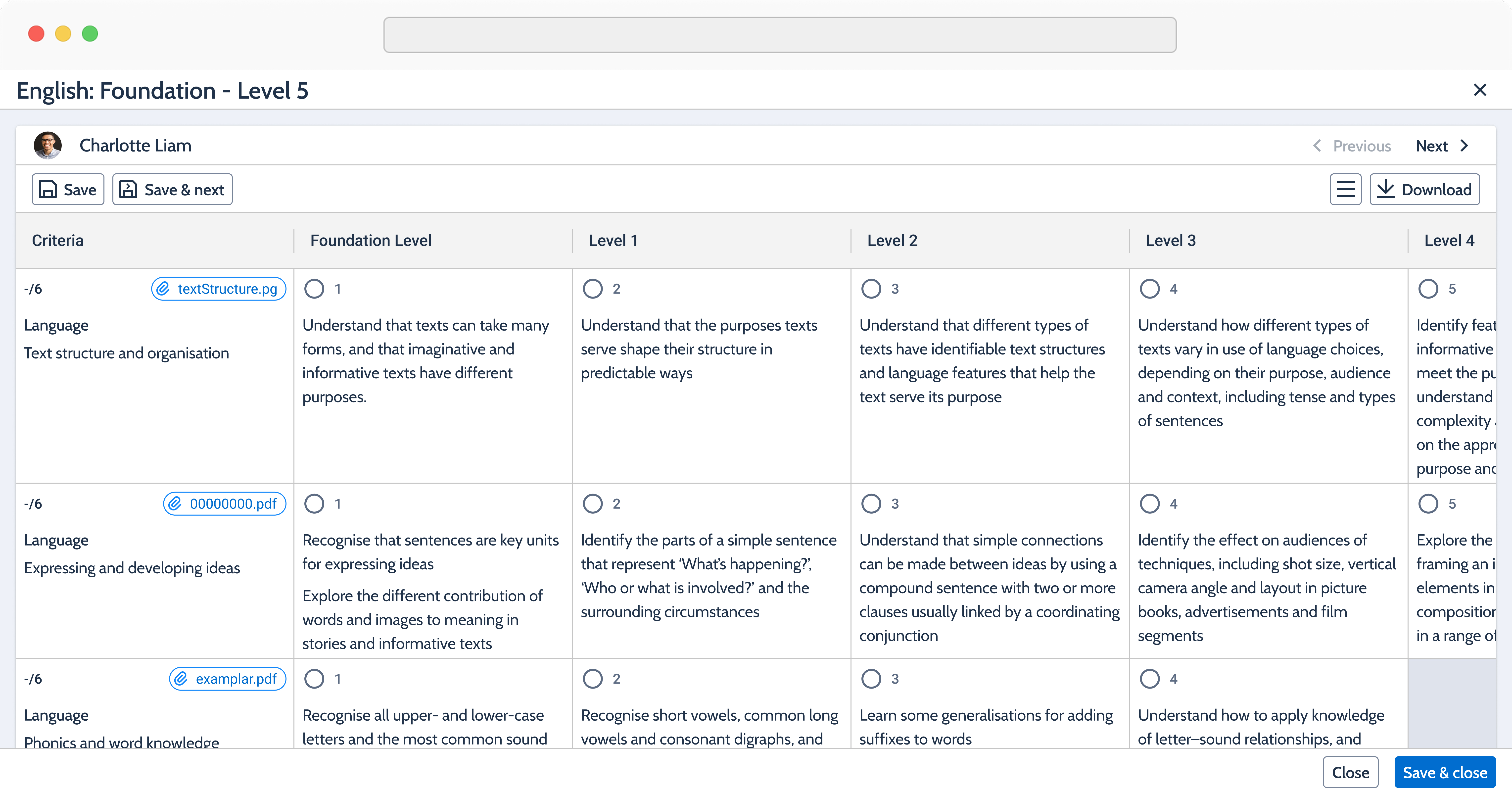
GIVEN I am viewing a rubric with a ‘Numeric’ scoring type WHEN I click on a radio button in any cell THEN that cell and the preceding cells are highlighted for that row AND the score on the selected cell is displayed on the ‘Criterion’ cell for that row AND the ‘Total’ is updated with the sum of the scores in the ‘Criteria’ column WHEN I [Save & close] THEN the rubric is saved AND the rubric side panel is closed AND the rubric score is updated on the 'Grading' section of the 'Results entry' dialog/modal AND a notification is displayed with the message: ”Rubrics successfully saved.”
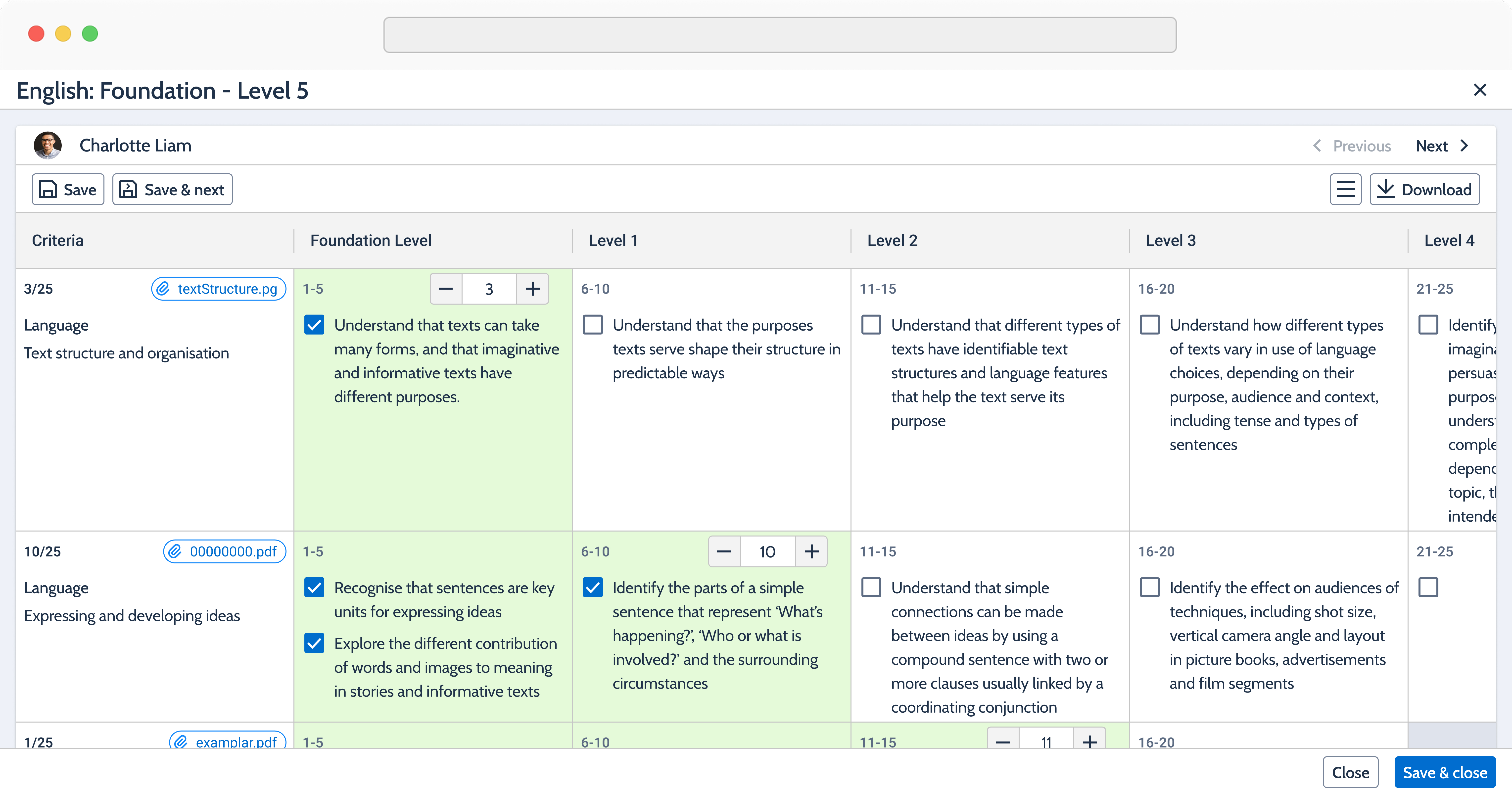
GIVEN I am viewing a rubrics with a ‘Score range’ scoring type WHEN I click on any cell THEN a number input field is displayed in that cell AND the minimum score for that cell is displayed on the input field AND the number on the input field is displayed on the ‘Criterion’ cell for that row AND the ‘Total’ is updated with the sum of the scores in the ‘Criteria’ column WHEN I [Save & close] THEN the rubric is saved AND the rubric side panel is closed AND the rubric score is updated on the 'Grading' section of the 'Results entry' dialog/modal AND a notification is displayed with the message: ”Rubrics successfully saved.”
GIVEN I am viewing a rubric of any scoring type AND ‘Partial grading’ is true WHEN I click on a radio button in any cell THEN that cell and the preceding cells are highlighted for that row AND the score on the selected cell is displayed on the ‘Criterion’ cell for that row AND the ‘Total’ is updated with the sum of the scores in the ‘Criteria’ column WHEN I click on any checkbox THEN that checkbox is enabled (enabling the checkboxes does not impact the score of the criterion or the overall score)
This project has been the biggest one I’ve undertaken at Compass. While it came with its share of challenges, the experience was rewarding and greatly enhanced my skills as a designer. It helped me build strong connections with all the teams involved.
Additionally, it provided a valuable opportunity to enhance my stakeholder management skills, taking them to the next level.
One key takeaway for me is the importance of thorough scoping. Although some of the issues we encountered with Rubrics were due to unforeseen circumstances, this project highlighted the value of proactively identifying potential bugs and planning for scenarios involving alerts and errors. It’s a lesson I’ll carry forward into my future projects.
Scoping is my favorite part of a project because it allows me to define clear objectives and sets the foundation of the project. However, this time, it also revealed its more challenging side, pushing me to grow and adapt :D

Why?
Design, validate and prepare the experience for development.
How?
Created prototypes, evolved the design system, explored workflows and produced development-ready designs.

Why?
Keep the project roadmap and progress visible.
How?
Maintained the project roadmap, tracked progress and shared updates with stakeholders.

Why?
Define and manage the work.
How?
Scoped the project, created the Epic and broke the work into actionable tickets, including additional work uncovered during the design process.

Why?
Create a shared source of truth.
How?
Documented processes, decisions, findings and project context, as well as capturing the case study throughout the project.

Why?
Turn customer conversations into actionable insights.
How?
Worked with session transcripts, tagged conversations and conducted thematic analysis to identify recurring patterns and feedback.
Interested in looking at the full works or want to connect? Send me a message and I’ll get back to you.