Redesigning Rubrics — Design process
Project brief
Rubrics are widely used by Victorian secondary schools, but Compass currently offers a limited rubric experience compared to other assessment platforms.
Schools increasingly use rubrics not just for grading, but to provide detailed feedback on student skills, progress, and achievement. As a result, some schools rely on third-party providers to meet their assessment needs.
This project aims to modernise rubrics, improve flexibility, and create a better experience for teachers, students, and parents.
Parts of a rubric and terminology (existing)
- Criteria (row) — The dimension against which the student is graded.
- Grading scale (column) — The level or performance for each criterion.
- Content descriptors (cells) — The skills to be achieved at a given grading scale for a criterion.
- Rubric type — The grade or score model for the rubric (for example numeric or score range).
- Victorian curriculum strand — Standards and levels from the Victorian Curriculum and Assessment Authority.
- Partial grading — Ability to select individual content descriptors on the grading screen.
- Guttman chart — Visual representation of student performance on individual skills or criteria.
- Exemplars — Examples of how student work should be marked against each criterion.
Design process
Discover
- Ran initial research and a stakeholder kick-off to define scope and success
- Identified reliance on third-party tools and gaps in create, edit, and grading workflows
- Defined the opportunity to evolve rubrics into richer assessment and feedback
Experiment
- Built create/edit and grading PoCs in React to test essential workflows
- Explored scoring types, partial grading, exemplars, blank cells, and student navigation
- Validated with Product, Engineering, and demo sessions with six schools
Deliver
- Produced dev-ready designs for rubric creation, grid configuration, and grading
- Documented four scoring types and grid behaviours for engineering handoff
- Scoped first-release workflows: configure grid, grade students, and save progress
Discover
I started with an initial research session and a kick-off session with stakeholders to understand the problem, define the scope, and align on what success should look like.
Because rubrics is a very old module, part of discovery was also understanding how the product works today and why certain previous implementation decisions were made.
Key themes
- Schools were relying on third-party tools for stronger rubric functionality.
- Teachers needed more flexibility when creating and grading rubrics.
- The current experience did not support common workflows like blank cells, partial grading, colour coding, or moving between students.
- The existing rubric structure made new functionality difficult to add.
- Rubrics needed to support richer feedback, not just grading.
The opportunity was to move rubrics from a basic grading component into a more flexible assessment and feedback experience.
Experiment
I explored the solution through proof of concepts before moving into dev-ready designs.
The goal of the PoCs was to test different workflows, understand what felt useful for schools, and identify which features were essential for the first release.
Create & Edit PoC
The create and edit PoC focused on improving how teachers set up rubrics.
I explored:
- A redesigned create/edit experience in React.
- An XL side panel for adding a rubric.
- Fields for name, score display, score range and bullet point display.
- Partial grading or shading controls.
- Colour coding for each criterion.
- Blank rubric cells that still support scoring.
- Clearer content descriptor behaviour.
- Inline editing for content descriptors.
- Drag and drop for criteria rows.
- Drag and drop for bullet points/content descriptors.
- Error states when scores do not match.
- Flipping the rubric axes.
Grading PoC
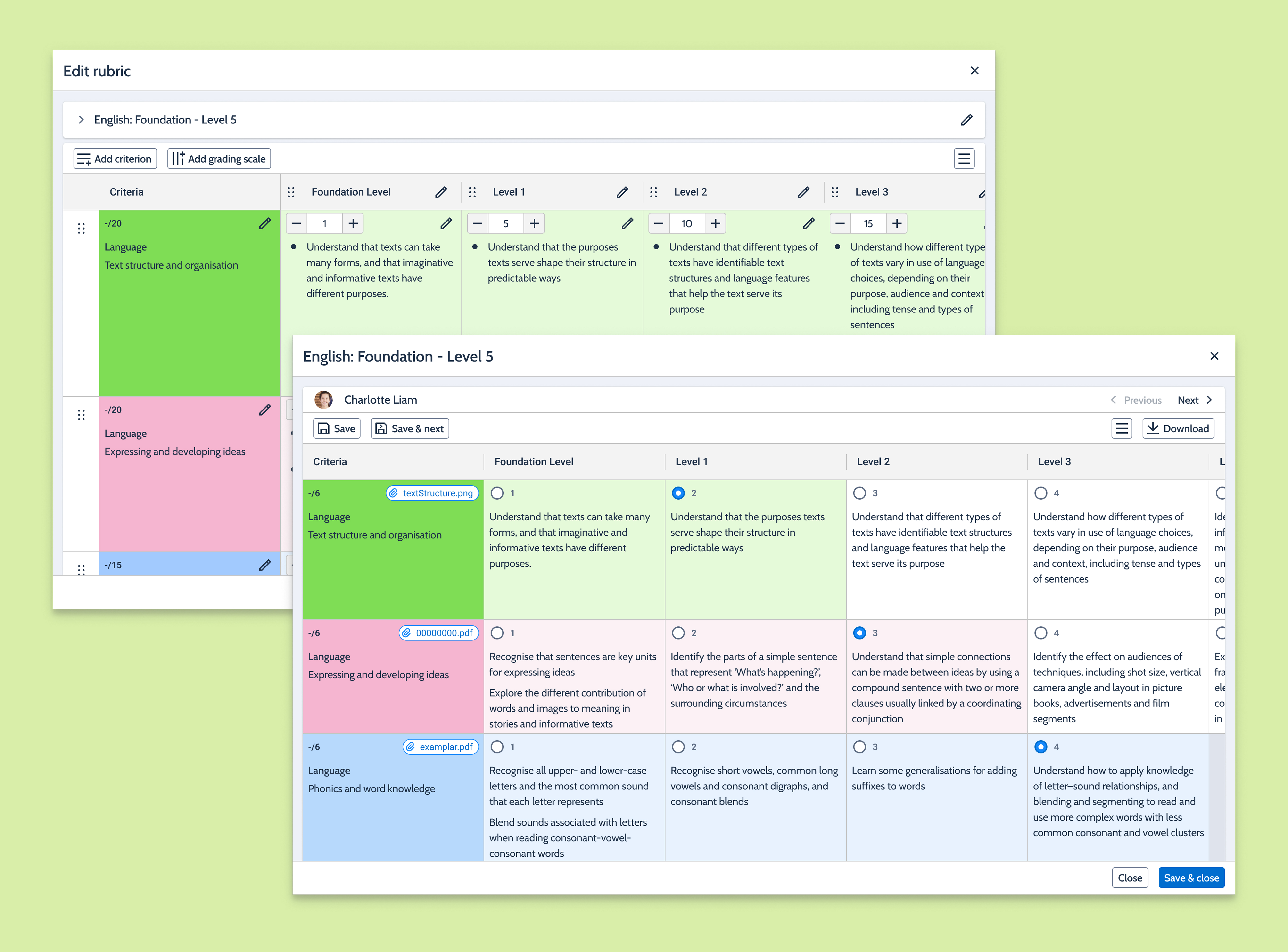
The grading PoC focused on making the marking experience faster, clearer, and more useful for teachers.
I explored:
- A redesigned grading screen in React.
- Selection and highlighting of content descriptors.
- Partial grading within cells.
- Behaviour for blank or inactive cells.
- Printing rubrics for individual students or in bulk.
- Attaching exemplars or evidence.
- Moving to the next student rubric.
- Score input for numeric, score range and Victorian Curriculum grades.
- Views with and without bullet point descriptors.
I also explored future-facing ideas such as:
- Guttman charts to view class progress.
- Exemplars and evidence attached directly to rubric cells.
Feedback & Validation
I reviewed the proof of concepts internally with Product and Engineering, then ran demo sessions with six schools.
Feedback was mostly positive. Schools liked the direction of the redesign and shared useful insights into how rubrics are used in day-to-day teaching.
Due to limited time, I was not able to fully analyse every session, but the feedback helped confirm the most important workflows and shaped the dev-ready designs.
Delivery: Uplifted work
Keen on looking at the final designs? Reach out to me!
Create rubric screen
What's happening today?
The current rubric creation experience provides limited flexibility and makes it difficult for teachers to configure rubrics to suit different assessment needs.
Teachers often need different scoring approaches depending on the subject, year level, or assessment type, however the current workflow does not support these scenarios particularly well.
The existing rubric structure also makes it difficult to introduce new functionality without significant effort.
What I'm delivering
A redesigned rubric creation experience that gives teachers more control during setup.
Teachers can configure:
- Scoring type.
- Number of criteria rows.
- Number of grading scale columns.
- Partial grading.
- Exemplars.
- Content descriptor display options.
- Score visibility.
Key Improvements
- ✅ Support for multiple scoring types
- ✅ Configurable rubric structure
- ✅ Better scalability for larger rubrics
- ✅ Foundation for future enhancements
Add new rubric — validation successful
- GIVEN I am viewing the ‘Add rubric’ side panel
- WHEN I have filled in the required fields (Click Rubric name/Description field → Click ‘Scoring type’ & select ‘Numeric’ → Click ‘Display rubric scores to’ & click ‘Students & parents’ → Click ‘Allow exemplars’ or ‘Allow partial grading’ → Click [Save])
- AND I click [Add rubric]
- WHEN validation is successful
- THEN the side panel is dismissed
- AND the ‘Edit rubric’ side panel is displayed with the details
- AND a rubric grid is created with the specified number of columns & rows
- AND a notification is displayed with the message: “Rubric successfully added.”
- AND the rubric is added to the ‘School resources’ page
Add new rubric — validation failed
- GIVEN I am viewing the ‘Add rubric’ side panel
- WHEN I have filled in the required fields (Click [Rubric] → ‘Add rubric’ side panel is displayed → Click [Save] → Fields are displayed with error states.)
- AND I click [Add rubric]
- AND validation failed
- THEN an alert is displayed with the message: “Sorry, we couldn’t continue because one or more issues were found.”
- AND the fields with the error are displayed with an error message
Grade rubric screen
What's happening today?
The current grading experience is functional but limited.
Teachers have to spend additional time navigating between students and grading can become repetitive when working through large classes.
The experience also lacks some of the flexibility schools expect from modern rubric tools.
What I'm delivering
A dedicated grading experience designed around teacher workflows.
Teachers can:
- Move between students using Previous and Next.
- Save progress at any time.
- Save and move directly to the next student.
- Use partial grading where enabled.
- Access exemplars while grading.
- Grade using multiple scoring methods.
Key Improvements
- ✅ Faster grading workflow
- ✅ Previous and Next student navigation
- ✅ Support for partial grading
- ✅ Support for exemplars
- ✅ Qualitative, Numeric, Score Range and Victorian Curriculum grading
- ✅ Improved visual feedback through colour-coded grading states
Numeric — Prototype
- GIVEN I am viewing a rubric with a ‘Numeric’ scoring type
- WHEN I click on a radio button in any cell (Click ‘Level 3’ cell on the first criterion → ‘Level 5’ cell on the first criterion → any cell on the other rows)
- THEN that cell and the preceding cells are highlighted for that row
- AND the score on the selected cell is displayed on the ‘Criterion’ cell for that row
- AND the ‘Total’ is updated with the sum of the scores in the ‘Criteria’ column
- WHEN I click [Save & close]
- THEN the rubric is saved
- AND the rubric side panel is closed
- AND the rubric score is updated on the ‘Grading’ section of the ‘Results entry’ dialog/modal
- AND a notification is displayed with the message: “Rubrics successfully saved.”
Score range — Prototype
- GIVEN I am viewing a rubric with a ‘Score range’ scoring type
- WHEN I click on any cell (Click ‘Level 3’ cell on the first criterion → ‘Level 5’ cell on the first criterion → any cell on the other rows)
- THEN a number input field is displayed in that cell
- AND the minimum score for that cell is displayed on the input field
- AND the number on the input field is displayed on the ‘Criterion’ cell for that row
- AND the ‘Total’ is updated with the sum of the scores in the ‘Criteria’ column
- WHEN I click [Save & close]
- THEN the rubric is saved
- AND the rubric side panel is closed
- AND the rubric score is updated on the ‘Grading’ section of the ‘Results entry’ dialog/modal
- AND a notification is displayed with the message: “Rubrics successfully saved.”
Grade rubrics (Partial grading) — Prototype
- GIVEN I am viewing a rubric of any scoring type
- AND ‘Partial grading’ is true
- WHEN I click on a radio button in any cell (Click ‘Level 3’ cell on the first criterion → ‘Level 5’ cell on the first criterion → any cell on the other rows)
- THEN that cell and the preceding cells are highlighted for that row
- AND the score on the selected cell is displayed on the ‘Criterion’ cell for that row
- AND the ‘Total’ is updated with the sum of the scores in the ‘Criteria’ column
- WHEN I click on any checkbox
- THEN that checkbox is enabled (enabling the checkboxes does not impact the score of the criterion or the overall score)